

“Once you use it, you won’t know how you ever survived without it” is a well worn cliche, applied over the years to every new technological development or advancement in gadgetry made available to the masses. The mobile phone, the electric toothbrush, ceramic hair straighteners – every important discovery of the technological era has been tarred with this overused tagline.
And the reason why? Because it’s actually true, and none more so than when talking about iPhone apps. You could probably survive without them, and you have perhaps been doing so, but they just make things so much easier, and not just for restaurant bookings and finding directions.
When it comes to web design, there are apps for nearly everything, from helping create color schemes to managing your busy schedule. Here are 15 of the best!
1. Ego

Ego is a brilliant way of checking your web statistics on a daily (or even hourly) basis. Able to support sites such as Twitter, Squarespace and Google Analytics, you can track the traffic to your website from the comfort of your iPhone without the time consuming pain of having to log in and out of each individually.
2. Palettes
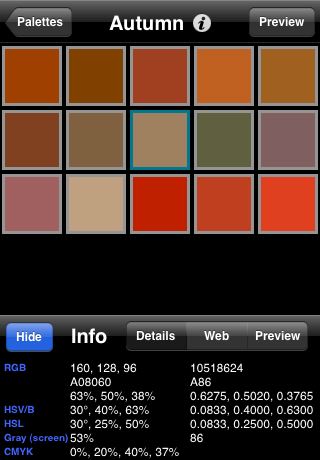
Particularly useful for the graphical web design, Palettes allows you to lift colous directly from any image you see online on your iPhone and create a ‘palette’ of your own, replicating exactly the desired color scheme. Palettes can be imported from or exported to other programs such as Photoshop and Illustrator, and offer a quick and efficient way of working with colors without having to compromise on accuracy.
3. WhatTheFont

One of the best things about using iPhone apps is the mobility that they offer. For example, if you see a font or lettering that catches your eye while out and about, simply take a photo and the WhatTheFont app will identify it, meaning you can incorporate it into your own designs in a matter of seconds. WhatTheFont works on practically every image, so even if the font is on a web page and not a photo, this app will still identify it for you, which has helped this app achieve almost cult status amongst designers.
4. FTP On The Go

FTP On The Go is one of the most popular business apps available. Not only does it allow you to perform website maintenance on the move as well as edit files on your FTP server, but the built-in browser means you can check and changes on your iPhone without having to leave the app itself.
5. ZeptoPad

Sometimes, as a web designer, you may have an impromptu moment of inspiration. And since pens and paper are about as fashionable as mullets, ZeptoPad is the ideal app for channeling this artistic creativity. It allows you to create vector images, simply by drawing on the screen with your fingers. The latest version even boasts P2P access, so you can share your masterpieces with all your ZeptoPadding friends and colleagues.
6. CSS Cheatsheet

Despite what many of us may think, none of us is completely perfect, and memory blanks can happen to the best of us. Luckily, there’s an app which prevents these memory blanks from stemming our creative flow when laying out a site. CSS Cheatsheet provides an in depth look at the workings of CSS, ideal for quick references or more detailed tutorials for beginners. And what’s more, it even works offline. Look out for similar apps for Javascript and PHP.
7. ProSEO

ProSEO is possibly the best Search Engine Optimization app on the iPhone. Not only can you track the progress of your domains and those of competitors, you can also keep track of the keywords that drive traffic to your your domain from the search engines. Other handy features include a phrase counter to help determine repetitive phrases as well as the ability to analyze link anchor text and image tags within documents. This is without doubt a key app for any web designer/developer who would like to see their sites ranking highly in Google, Yahoo! or Bing.
8. WorkTimer

Working as a web designer with many clients (often spread out geographically) means a structured 9 to 5 is often too difficult to organize and equally impractical. However, you still need to keep track of how much time you spend working on each project, which is where the WorkTimer comes in. By simply pressing the screen, you can keep a log of how many hours you’ve spent working – one less thing to clutter your mind and distract your creative genius!
9. CliqCliq Colours

Possibly the primary color app for graphic and web designers alike, CliqCliq Colors allows you to find the exact color you need as well as converting it to a variety of scales and formats. Similar to the Palettes app, CliqCliq Colors allows you to take colors from images of photos seen directly on your iPhone’s screen.
10. Analytics

Analytics is the number one app for Google Analytics. Like a more detailed version of the Ego app, the free Analytics Lite allows you to check statistics and track traffic, with the Analytics Pro app allowing the user to view over 50 Google Analytics reports as well as examining traffic sources and Ecommerce statistics, meaning you can keep up with your sites’ performances wherever you are.
11. Photobucket

The Photobucket app means you can carry one of the largest photo sharing networks with you at all times, with access to your personal and friends’ albums at the touch of a screen. This is particularly useful for designers looking for photos to be used directly or even just for color schemes. And as it costs absolutely nothing, it’s an app definitely worth downloading if only as a back up source of images.
12. Ping
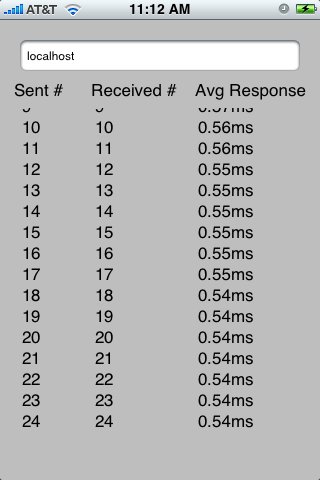
A useful tool for any designers or developers who are on the move a lot, but can’t afford to lose touch with their servers. Ping tests whether your servers are up and running and accessible, as well as checking that they are responding on the internet or on a private network. The Ping app is quick and easy, a role model for all other apps of its kind.
13. Dexigner

In any sort of design field, it’s vital to keep on top of design news and developments, which is where the Dexigner web app comes in. Dexigner provides the latest design news, whether be graphic design or fashion, straight to your iPhone. Excellent train journey reading material for when you aren’t taking photos of billboards and taking inspiration from their fonts and colors of course!
14. Source Viewer

An especially simple app, Source Viewer allows you, surprisingly enough, to view the HTML, CSS and Javascript source code of any website you like. Something you may take for granted when using your laptop or desktop computer, only made portable by this handy little app.
15. DatabaseViewer

As the DatabaseViewer’s description reads, quite simply ‘view any database on any iPhone anywhere’. You can view a variety of databases such as MS Access, MS Excel, FilePro and SQL, with the ability to sync any changes or developments of a certain database to stay right up to date.
About The Author
 Tom Walker writes a blog about technology and gadgets for a leading supplier of ink to the print industry based in Great Britain. You can also follow him on Twitter.





Pingback: How to Design App Icons for iPhone and iPad | Tips