100+ Photography Enhancing Photoshop Actions
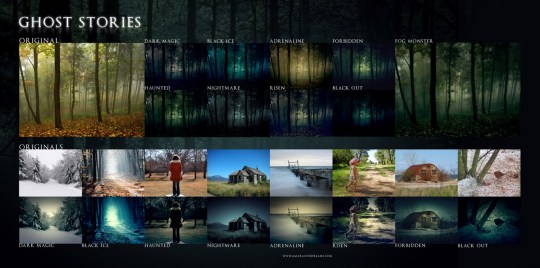
Photoshop actions can be a big time saver, especially when you’re trying to add a specific effect to a photo and you’re not sure how to do it. Thanks to talented and generous Photoshop users, we can simply click a button and our photography can take on a whole new look. For this post we’ve rounded up over 100 Photoshop actions for enhancing your photos. In this collection you’ll notice a wide variety of actions, from vintage effects to amazing color alterations.
Above image by Sid Black.
Nothing but Memories (10 Actions)
Retro
Color Action
Pink Action
Photoshop Actions 13 (8 actions)
Photoshop Actions 67 (11 actions)
Photoshop Actions (6 actions)
Pinhole Effect
PS Vintage Action
Vintage Wash Action
sa-cool actions 2.08 colors (17 actions)
Polaroid GENERATOR
kream action
Cookie Dough Action
vintage wash ps actions
Photoshop Actions – 139 (8 actions)
Variety Pack Actions .3 (5 actions)

photoshop actions – 33 (8 actions)
photoshop actions – 8 (8 actions)
Related Posts
Here's some other articles that you will definitely find useful.


19 comments
Theo
April 12, 2010Thanks for this time saving collection !
Jae Xavier
April 12, 2010Very informative! Now only if cellphone cameras can do the same thing… What a great idea!
Lena Tailor | DT
April 12, 2010You are the real time saver. Appreciate your efforts in putting this together.
monica of hola!design
April 12, 2010Great examples! I was looking for a collection of cool effects for a project I’m working on. I specially like the pinhole effect.
It’s interesting how color treatment can really give a picture that wow factor. Great post.
jack parsons
April 12, 2010Seriously, this is crap. All of the actions = “oversaturate”, except for that Polaroid generator. These kinds of crappy Digg fodder posts are a dime a dozen and a complete waste of your readers’ time. Simply googling list+of+photoshop+actions presented hundreds, if not thousands of listicle posts that preceded yours.
kyle steed
April 12, 2010Amen. Couldn’t have said it better myself Jack.
If you are serious about photography and want to learn what makes a photograph better, take a class or buy a book, don’t depend on PS actions to save the day. Because when you break it down, a bad photo is a bad photo no matter how good at photoshop you are.
These kinds of blog posts are exactly what the internet doesn’t need more of. Why not write an original article about how to spend time focusing on composition and lighting instead of just throwing a bunch of links to actions in there? Not to say that all actions are bad, but this is just a waste of your readers time.
Robert Tutsky
May 14, 2011Totally agree. If you are PS savvy, you are better off generating your own effects to your liking, otherwise it’s a waste of hard drive space.
Eddie
April 12, 2010Mr. Kyle and Jack,
Why do you take it so seriously? Maybe this is just for the fun of it? BTW, this is a big trend in consumer/prosumer/ & even professional photography right now. It looks awesome. Lighten up a little and give the author some credit for the time spent on this list.
jack parsons
April 13, 2010Are you kidding? Go ahead and google it, posts exactly like this one appear on instablogs every single day. They’re rife in the design community for one reason and one reason alone, and it ain’t because it’s “helpful”. It’s because it’s “easy”.
I honestly would have been less salty if I hadn’t looked at that sidebar and seen almost *every single post* is yet another listicle, with “55 Essential Inspirations” and “101 Websites So Awesome They’ll Devour Your Eyeballs” — compiling resources that have been compiled before and will be compiled yet again.
To the author: is this why you got involved in blogging and in design? I don’t know, I just assume that most people interested in this actually like to create things.
Website Design
April 13, 2010Good work!!!
Thanks for sharing this post.
Digital Photo
April 13, 2010Wow, thanks for this list, it does make life a little easier!
mac
April 14, 2010really love this post!
Web Risorsa
April 15, 2010Great list of Photoshop actions.. Thanks for sharing with us…
Marty
April 17, 2010Can you really ever get enough great photoshop actions?? (rhetorical question)
Super Target Me
May 17, 2010Just amazing!! Thank u!
K.F.C
June 12, 2010@JAck: shut up and let people enjoy the actions themself… you are so noisy here
HiTheSun
July 14, 2010Great Effect! Love it
vuitton
August 16, 2010Great Effect! Love it
Denim Geek
June 20, 2011quality effects, been searching for lomography effects for some time now, are any of these transferable to lightroom presets? Cheers
2 Trackbacks
[...] = 'bit.ly'; Share The term Bokeh comes from a Japanese word that means “blur”. In photography, it’s used to describe the blur or the quality of the blur in the out-of-focus regions of an [...]
[...] Skills may span a broad range of tools, but probably the most used tool of all designers is Photoshop. In this post, we’ve collected 15 fresh and useful Photoshop tutorials to help you brush up [...]